
Multisite CMS: benefits, key features and best practices
Romain Gauthier
A multisite CMS lets an organization manage several websites from a shared platform, with the ability to reuse content, assets, templates and components across sites. Independent sites can stay simpler when their technology, governance and content have little in common. Multisite becomes more valuable as sites begin to share content, components, infrastructure, integrations or governance rules.
What the decision turns on, then, is not how many sites you run. It is how much those sites benefit from sharing.
Managing a website is no small task. But when you have to oversee 10, 20, or even a hundred, the challenge takes on a whole new dimension. From corporate websites and customer portals to subsidiary sites and event pages, the list grows quickly, especially in an international or multi-brand context. Each new project requires time and resources. And the complexity only increases when these sites must be integrated into a larger digital ecosystem while staying compliant with regulations.
Every project consumes time and budget, and draws on technical and business teams. As the digital ecosystem expands, so do the challenges: loss of consistency, extended timelines, rising costs, complex governance, growing security risks, and compliance issues.
So how can you keep control of dozens of sites without losing consistency, productivity, or brand identity?
In a word: multisite. A multisite CMS centralizes what those sites have in common, so that the work of running one more of them stops growing in step with their number.
In this article, we’ll cover:
- What a multisite CMS is and the challenges it addresses
- The main types of multisite projects
- Why choose a multisite CMS rather than independent sites
- The essential features of a good multisite CMS
- The impact of AI on multisite management
Multisite CMS: definition and challenges for businesses
What is a multisite CMS?
A multisite CMS is a content management platform that enables you to create and manage multiple websites from a single, centralized interface. It allows you to deploy and oversee dozens, or even hundreds, of separate sites at once, while giving the organization the means to keep them technically and editorially consistent.
The system is built on a shared architecture where technical resources (servers, databases) are pooled, along with selected components such as templates, modules, and connectors. At the same time, each site retains its own identity, including domain name, theme, unique content, specific components if needed, permissions, languages, and custom configurations.
Multisite CMS vs. multi-tenant CMS: what are the differences?
A distinction is often made between two approaches:
- Multisite CMS: A single technical environment is used to create and manage multiple sites, typically within the same organization, by sharing some or all resources (code, databases, components, etc.).
- Multi-tenant CMS: The platform serves several tenants from a shared runtime, with data, configuration and rights isolated per tenant. Isolation is logical rather than physical in most implementations, and how strict it is, including whether a tenant can get its own database, is exactly what to verify with a vendor.
In practice, the two terms are sometimes used interchangeably. What really matters is defining your specific requirements for isolation, governance, and customization.
Current challenges in multisite management
For an organization with several divisions, brands or markets, a single website may no longer meet every entity’s needs. Each one tends to want its own web presence, with tailored messaging and design. But this evolution brings a new set of strategic challenges.
1) Increasing complexity at the group level
Organizations are facing an explosion of digital touchpoints: websites, mobile apps, service portals, and more. Channels continue to multiply, along with the number of languages, brands, and markets to address.
This complexity is not limited to a handful of large groups: as an organization publishes to more geographies and more channels, the need for management and collaboration tools that people can actually read grows with it.
In response, leadership teams are seeking to simplify their technology ecosystems. Consolidating web projects within a single platform is now a primary driver of efficiency. In this context, CMS platforms are no longer just about maintaining multiple sites: they are becoming levers for industrializing digital production. A multisite CMS is one way to run them as a set rather than as a collection of separate projects.
2) Time-to-market
Speed to market remains a decisive factor for competitiveness. In the context of web projects, this means ensuring contributors can work independently and at pace. Yet, this need for speed often conflicts with IT control, security requirements, and brand governance.
With an enterprise multisite CMS, organizations can provide teams or business units with ready-to-use templates, customizable or standardized depending on governance rules. This reduces time-to-market while preserving both brand consistency and IT oversight. This model is often referred to as a site factory.
3) Brand consistency
Ensuring a consistent visual and editorial identity across dozens of sites is a constant challenge, especially with diverse teams and contributors. Each group develops its own habits, uses different design elements, and interprets editorial rules in its own way. Over time, these variations dilute the brand.
Siloed operations also increase the risk of inconsistencies. When the same information must be updated manually across multiple interfaces, outdated content becomes more likely. Common issues include outdated logos, obsolete key figures, or messaging that no longer reflects the company’s value proposition. In short: duplicate content often equals outdated content.
4) Security and governance
As the number of independently managed platforms grows, holding a consistent security posture gets harder. Different CMS instances, extensions and configurations multiply the systems that have to be patched, monitored and audited, and complicate the rollout of consistent security policies. Centralizing helps govern that, and it also concentrates more sites on one platform, which is its own risk to manage. Each independent platform requires its own updates, backups, and monitoring, leaving room for vulnerabilities and misconfigurations.
User access management also becomes a major challenge. How do you effectively govern hundreds of contributors across dozens of platforms? How do you maintain visibility into permissions across all environments? Without centralized oversight, risks escalate: orphaned accounts, outdated access rights, weak or reused passwords, and shared credentials.
5) Compliance
Regulatory compliance adds yet another layer of complexity. Standards vary by country and industry, from GDPR in Europe to CCPA in California, and sector-specific rules in finance, healthcare, and beyond. Ensuring consistent application across all sites is essential to avoid costly legal and financial risks.
6) Time Lost in Creation and Maintenance
Building a website from scratch remains a resource-intensive process, requiring technical setup, configuration, feature development, and third-party integrations. This project-by-project approach ties up teams in repetitive tasks.
Maintenance presents similar challenges: each update or security patch must be deployed separately on each instance, often by different teams, multiplying the risk of errors and delays. And costs can keep rising as instances multiply. For example, plugin updates can break compatibility with templates, driving up long-term maintenance expenses.
7) The Delicate Balance Between Control and Productivity
One of the biggest paradoxes in multisite management is balancing centralization with autonomy. On one hand, organizations need IT structure and brand consistency. On the other, they need local speed and flexibility.
The result is often a swing between two extremes: strict governance that stifles creativity and slows projects, or total freedom that creates inconsistency and governance headaches. Competitive pressures only heighten this tension, demanding both speed and quality.
This is why management teams are turning to solutions that balance centralized control with operational agility, avoiding overly rigid tools that discourage adoption while still ensuring brand and security standards are upheld.
The different types of multisite projects
Multisite projects fall into a handful of recognizable shapes: a portfolio of heterogeneous sites, a set of near-identical sites for franchises or partners, country and language variants of one site, and brand portfolios that share a repository without sharing a look. The shape decides the governance model; the number of sites decides how much that model has to be industrialized.
The term "multisite" covers a wide variety of use cases, depending on an organization’s context and objectives. Understanding these main types helps businesses choose the right CMS and structure governance more effectively.
1) Multiple heterogeneous sites
A company may want to centralize the management of a wide range of sites with different goals, such as:
- Corporate websites
- Conversion-focused product or service sites
- Event sites or short-lived campaign landing pages
- Microsites dedicated to internal initiatives or CSR programs
With a strong multisite CMS, all of these use cases can be managed within the same environment, without overcomplicating workflows.
| The Wallonia public service has set up an internal structure capable of meeting the expectations of administrations and local authorities. Its sites, with varied objectives and very different identities, are deployed on a single platform. |
2) Multiple web projects
Beyond traditional websites, a company’s digital ecosystem often includes portals and applications that rely on a content management component. In these cases, the CMS powers a wide variety of interfaces, each with unique requirements.
This adds complexity for user experience design: ensuring not only a consistent look and feel, but also customer journeys that hold together from one site to the next. For instance, users should not have to log in again when navigating from one company site to another, and the visual identity should remain coherent across all properties.
3) Multi-country sites and global presence
Expanding internationally is far more complex than duplicating existing pages. Each market often requires its own product catalogs and customer journeys. A global digital presence introduces specific needs, such as:
- Managing multiple languages and regional markets
- Adapting content to local cultural nuances while maintaining global brand consistency
- Adjusting features for local requirements (payment methods, integrations, date formats, compliance with local standards)
- Applying international SEO best practices
| Ben & Jerry’s, the ice cream seller, runs 30 websites in 20 languages on its Jahia multisite platform, which lets it address each market specifically. |
4) Multi-brand ecosystem
Some companies oversee a portfolio of brands, each with its own identity, audience, and product offering. A multisite CMS makes it possible to:
- Create distinct sites for each brand
- Share components and modules only where relevant
- Adapt templates, design systems, and content without starting from scratch every time
The goal is twofold: maximize efficiency while protecting each brand’s unique DNA. A well-structured multisite architecture also makes it easier to build across brands, with cross-brand comparison tools or shared recommendation engines.
In a multi-brand group, this model comes down to a split of responsibilities: common components are developed and maintained centrally, while each brand keeps the ability to carry out its own development work with its dedicated teams.
5) Network of agency sites
Industries such as automotive, banking, insurance, and retail often operate through large networks of agencies or franchisees, each requiring its own online presence. For insurers, our guide to a multi-site CMS for insurance covers brands, agencies and compliance in more detail.
This can range from a simple, locally customized page to a more comprehensive mini-site. The primary goal is to provide each location with local visibility while maintaining overall brand consistency. Within a predefined framework, each agency should be able to manage its own content, such as opening hours, staff information, and local promotions.
The challenge lies in industrializing the creation and management of these sites across hundreds (or even thousands) of locations. For large-scale networks, a traditional site-by-site approach quickly becomes unmanageable. A multisite CMS lets the cost of creating and maintaining these sites be shared more widely as the network grows, rather than paid again at each location.
Why choose a multisite CMS?
A multisite CMS pays off when several sites share content, assets or templates, and when launching a new one should be a configuration task rather than a project. When there is little to share between sites, independent platforms can stay simpler to operate.
Adopting a multisite platform means adopting a new way of managing your digital ecosystem. Before making a decision, it’s important to weigh the tangible benefits and understand how this model differs from a site-by-site approach.
The advantages of a multisite CMS
Let’s explore how a multisite CMS provides concrete solutions to the challenges outlined above.
1) Centralized but Flexible Governance
The growth of sites, teams, and brands calls for strong governance. But consolidation should not come at the cost of excessive standardization. One of the greatest advantages of a well-designed multisite CMS is its ability to balance global control with local autonomy.
Through fine-grained management of roles and permissions, whether at the level of business units, subsidiaries, brands, or agencies, a multisite CMS enables federated governance. This model combines centralized oversight with decentralized execution, ensuring both consistency and flexibility. It also helps address the diverse expectations of IT teams (who need structure and security) and business users (who need speed and agility).
2) Time Savings and Increased Productivity
A multisite CMS streamlines both technical and human resources by maximizing reuse across projects.
On the technical side, components developed once can be deployed across multiple sites, saving time and reducing duplication. Common examples of reusable developments include:
- Cookie banners;
- Data layers for analytics;
- External integrations (CRM, PIM, DAM, etc.);
- Authentication (SSO, SAML, OAuth);
- Visual/editorial components;
- Layout management tools;
- On-site search engine;
- Contact blocks.
This approach means most projects no longer start from scratch, and the foundations stay consistent between them. As a result, development teams can focus on evolving shared building blocks instead of maintaining fragmented silos.
On the human side, skills carry across the ecosystem. Developers build expertise on one platform rather than on several, and contributors trained on the CMS interface find their bearings on another site quickly, which makes cross-functional collaboration easier and helps absorb peaks in workload.
By standardizing practices and pooling resources, organizations accelerate project timelines and launch new sites far more efficiently.
3) A harmonized brand image
Maintaining a consistent brand identity across all touchpoints is a top priority for marketing and communications teams. A multisite CMS makes this possible by providing a shared repository, a central library of assets (images, documents, and templates) so that teams work from one up-to-date, guideline-compliant version rather than from local copies. This makes adherence to brand standards systematic, even in complex, multilingual contexts.
Brand managers also benefit from full visibility into deployments across sites. They can quickly step in to correct any deviations, and this proactive oversight helps limit "shadow projects" developed outside of official governance.
At the same time, this approach still supports local or entity-specific variations. Field teams can create content independently, while remaining aligned with the organization’s predefined visual and editorial framework.
4) The "site factory" model, for scalable efficiency
The term "site factory" has no single standardized definition in the market. However, it is increasingly used to describe an industrialized web production model designed to support the scaling needs of multi-site organizations.
At Jahia, we use the term to describe a set of technical processes and methodologies for designing, building, and publishing websites using a predefined feature set. If the production model interests you more than the platform, our five steps to set up a site factory walk through it.
More of the work involved in launching a new site shifts from development to configuration, and the visual and technical baseline is inherited rather than rebuilt. Predefined templates, preconfigured permissions and standardized settings are applied as configuration, which lets teams spend their time on content and design rather than on rebuilding the same foundations.
Multisite CMS or independent sites: Which model should you choose?
When an organization manages multiple websites, a key strategic question arises: should they all be managed on a single platform or spread across separate CMSs?
There is no one-size-fits-all answer, it depends on your organizational structure, level of digital maturity, and business priorities. Below, we outline points of comparison and key criteria to help you assess which model best suits your needs.
1) Comparison between multisite CMS and separate CMS
| Criterion | Multisite CMS | Separate CMS platforms |
|---|---|---|
| Maintenance cost | Can reduce duplicated infrastructure, development and maintenance costs at scale. | Can be economical for a small number of independent sites, though duplicated costs tend to rise as the portfolio grows. |
| Time to launch | Can accelerate deployment when sites reuse templates, components and processes. | Can require repeated development and configuration when each site is managed independently. |
| Autonomy of local entities | Autonomy governed by central rules. | Autonomy on the CMS, the design and the content model, with no shared baseline to inherit. |
| Brand consistency / UX | Easier to keep consistent, since templates, components and brand rules are shared, with less room for local variation. | Risk of disparities if there is no central governance. |
| Scalability | Designed to add sites and languages within a shared operating model. | Possible, but more difficult to organize and maintain over the long term. |
| Governance complexity | Centralized governance with controlled delegation (roles, permissions). | Decentralized governance, which can sometimes be difficult to harmonize or supervise. |
| Security and compliance | Centralizes security policies and updates, and makes securing the shared platform that much more important. | Varies depending on local choices, more difficult to audit globally. |
| Technical maintenance | Shared: a single platform to develop, even though a real architecture may span several environments and front ends. | Fragmented: each CMS requires its own maintenance and updates. |
| Technological dependency | Platform dependency: a migration affects the whole portfolio at once. | Freedom of choice per entity, at the cost of fragmentation. |
| Interoperability / integrations | Centralized and reusable integrations between sites. | Adaptations to local tools. |
| Visibility and global management | Makes centralized oversight easier when analytics and governance are standardized across sites. | Fragmented view: data is hard to aggregate without an extra layer. |
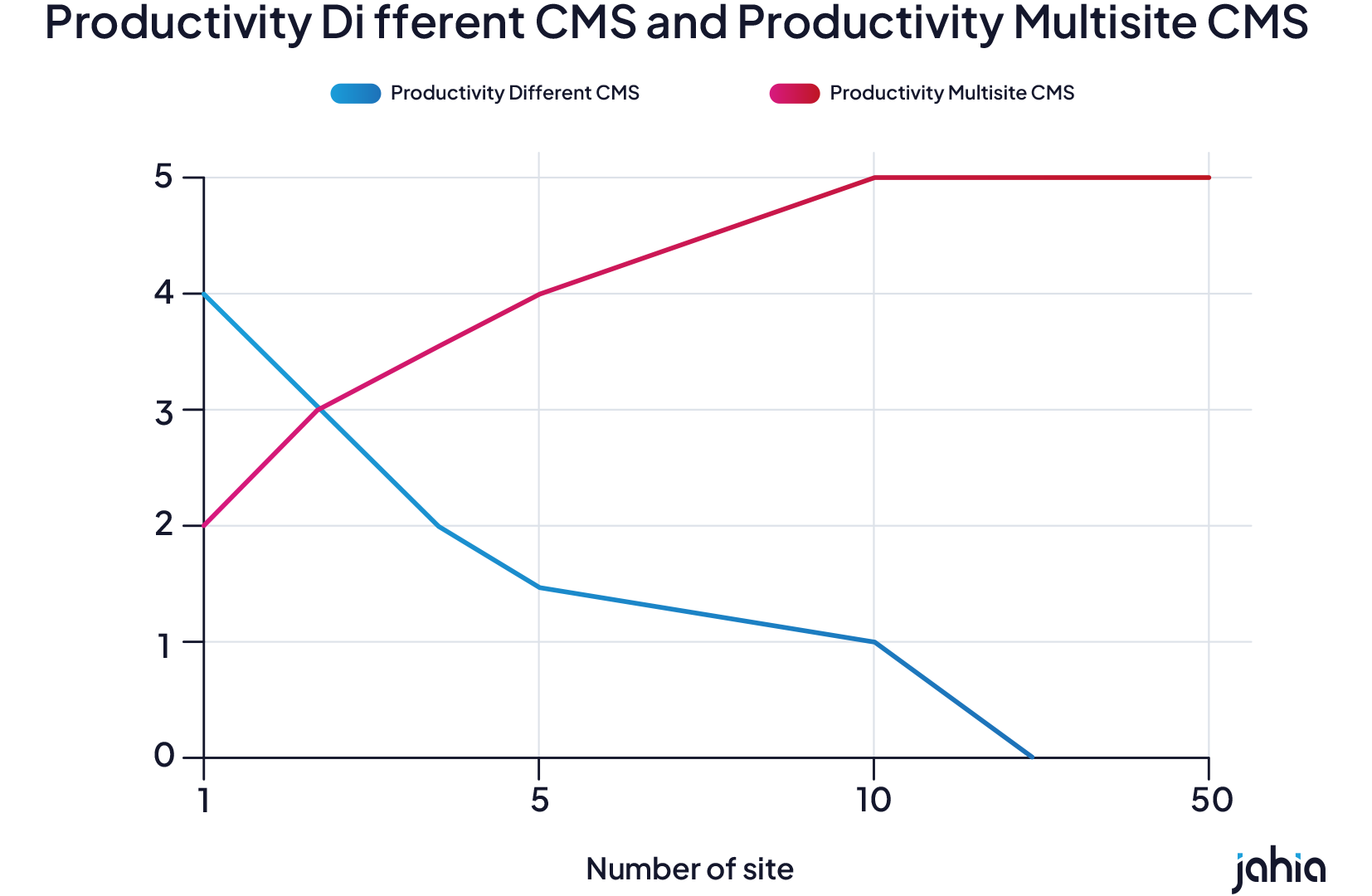
2) Identifying the model best suited to your organization
Opt for a multisite CMS if:
- You are a company with multiple brands, subsidiaries, geographic locations, or business units with specific objectives.
- You are preparing for rapid growth or streamlining your digital ecosystem.
- You want to accelerate your web projects.
- You want to harmonize your digital presence across multiple entities or brands.
- You want to ensure centralized control (security, compliance, brand guidelines).
- You deploy similar sites (franchise, partner network).
Choose independent websites if:
- Your entities have very specific needs or constraints.
- You do not plan to share your developments or content.
- You have the budget and resources to manage and maintain multiple CMSs.
The essential features of a good multisite CMS
Three capabilities matter most when evaluating a CMS for multisite at scale: a repository shared across sites, rights that follow both the site and the role, and site creation from a reusable model. The sections below take them in order, then cover what surrounds them. If you want the method rather than the platform, our nine questions to ask yourself before choosing a multisite CMS walk through it step by step.
A multisite content management system must offer features that increase efficiency, maintain editorial consistency, and reduce costs in the long term.
1) A central repository for images and documents (assets)
A multisite CMS simplifies control by centralizing:
- page templates;
- the components;
- visual elements.
A change to one of these elements takes effect, once published, on every page that references it, instead of having to be repeated site by site. How a platform handles divergence, when one site needs its own version of a shared element, is worth testing on your own content before you commit.
2) A single interface with granular rights management
Thanks to a high-quality central interface, administrators can intuitively navigate between sites while maintaining an overview of activities and performance. Rights management forms the basis of this centralization. An effective system allows permissions to be defined according to multiple dimensions: by site, by role, by user group, by content type, etc.
It is also essential to be able to clearly distinguish between the roles of contributor, approver, and administrator for each site or section in order to maintain a high level of security and control. Such granularity allows for very precise configurations, adapted to complex organizational structures.
This approach encourages the involvement of field teams. For example, a regional marketing manager may have full administrative rights over the websites in their geographical area, without access to the group’s other web projects.
|
Jahia advanced role and permission features:
|
3) Tools for quickly creating new websites
A multisite platform must, of course, allow you to deploy new sites very easily. This ability to industrialize creation is based on advanced reuse, preconfiguration, and customization features, adapted to the needs of both business and technical teams. In particular, reusing modules is what separates configuring a new site from building one, and the gap widens with every site added.
|
In the Jahia CMS, a new site is created from the interface in one of three ways, which differ by how much of the site already exists. Two further routes exist through the API, GraphQL and provisioning, for teams that automate site creation.
|
4) Sharing content between sites
In a multisite approach, reuse is common: regulatory data, group news, presentations of joint offers, etc. To avoid duplicating elements and risking inconsistency or obsolescence, it is essential to be able to share content between multiple sites.
Effective multisite platforms separate reusable content from the pages that display it, so that the same content item can be referenced across several sites instead of copied into each. You can create folders of reusable content, intended to be shared, which authorized contributors then reference from their own pages.
This logic of Single source of truth transforms cross-functional content management. The principle is to gather critical information in one place and distribute it across all interfaces. This improves consistency by reducing the number of independent copies teams have to keep up to date.
The SEO benefit is operational rather than automatic. One source makes it practical to declare which URL is canonical and to keep hreflang consistent across markets, instead of arbitrating between near-identical pages after the fact.
5) Selective activation of plugins and modules
A well-designed CMS must offer a system of modules that can be activated on a site-by-site basis to meet the specific needs of each project without cluttering the interface for users.
This approach makes it possible to build a library of reusable components (SEO, forms, authentication, integrations, etc.). It is then easy to draw on the modules developed for the ecosystem, while retaining the ability to enable or disable features.
A temporary event site does not need the same features as a permanent e-commerce portal, and that differentiation has to be achievable from the administration interface rather than through a development project.
6) Connecting to the digital ecosystem
A content management system is never a stand-alone component. To be part of a digital strategy, it must integrate easily with the organization’s business and marketing tools: DAM, CRM, PIM, web analytics tools, etc.
A multisite platform must therefore offer either:
- native connectors to third-party tools;
- an open architecture, allowing the integration of internal or specific tools via API.
This connectivity avoids silos and ensures the centralization of data useful for personalization, performance measurement, or rich media management. The CMS then becomes a true digital hub, channeling not only the distribution of content, but also its enrichment. This implies the ability to circulate data in both directions, between the CMS and these systems.
7) A productive CMS for business users and developers
The productivity of a multisite CMS can be measured on two levels: ease of learning and use for contributors, and speed of development for technical teams. The goal is to save time at every stage of a site’s lifecycle, from creation to publication, including updates and optimizations.
For business teams, the interface must remain intuitive despite its underlying complexity, offering quick mastery even for non-technical profiles. For developers, the solution must provide the tools and frameworks needed to accelerate the creation of new components or integration with third-party systems.
8) Software scalability
A good multisite CMS is structured to support an organization’s digital ambitions over time, and to keep the dependencies it creates visible rather than hidden. It must therefore be natively scalable, capable of keeping pace with the company’s development in several areas:
- volume of content and assets;
- volume of components;
- extension/customization/integration possibilities;
- security and compliance.
Look for an architecture that absorbs growth through scaling and configuration rather than through re-architecture, so that performance stays a capacity question rather than a design limit. From a technical standpoint, the architecture should make it possible to scale the resources under pressure without redesigning the whole platform.
In addition, the CMS must remain efficient and easy to administer, without requiring extensive reconfiguration. And for regulated sectors in particular, the ability to host on a sovereign cloud is becoming a key criterion.
The impact of artificial intelligence on multisite management
In a multisite context, AI is used mostly to industrialize variation: adapting one piece of content to a market, a language or an audience without rewriting it from scratch. It changes how fast the work is done, and it adds one governance question rather than removing any: who validates what a model has produced, and under whose name it is published.
It enables the industrialization of content variation, making it possible to generate editorial adaptations tailored to cultural nuances, local regulations, or marketing messages specific to each entity. Tone, emphasis and format can be adapted per market without rewriting the source, with a local contributor validating the result.
The first concrete use is translation. Recent engines have become reliable enough to cover a wide range of languages quickly, with local teams stepping in only for adjustments. In tooling terms this covers two distinct things: assisted translation that can process a full page against an in-house glossary, and a side-by-side review interface where two languages are compared field by field. In Jahia, the first runs on DeepL or ChatGPT and skips duplicates and unchanged items, which matters when the same content exists across thirty sites; the second shows shared fields as read-only, so a reviewer immediately sees what is common to every site and what belongs to the one being reviewed.
The second use is less visible and weighs more at scale: content classification. Across dozens of sites, finding a piece of content assumes it was tagged, and manual tagging is the first task dropped when deadlines tighten. Automatic tagging handles it without asking anything of the contributor.
But the relationship between multisite and AI goes beyond content production. Published web content can be one of the sources AI-powered search engines and assistants draw on when they generate answers about your brand. Their mechanisms differ, and not all of them crawl your pages directly, which makes what you publish, and what you allow to be crawled, a decision worth taking deliberately. This means a multisite CMS is not just a publishing tool, it’s a strategic vehicle for information dissemination, shaping both what audiences see on your websites and what AI systems may later reuse in their outputs.
For this reason, organizations need to rethink their multisite strategies in light of this new reality. Effective governance, together with content that is structured, consistent and accessible, improves your chances of giving search engines and assistants reliable information about your organization.
Frequently asked questions
What is a multisite CMS?
What are the challenges of a multisite CMS?
What features matter most in a CMS for multisite content management?
How do multisite CMS platforms handle shared and reusable content?
How do you compare multisite CMS platforms for long-term scalability?
What makes a CMS suitable for global, multi-site enterprise deployments?
How many sites do you need to justify a multisite CMS?
Multisite CMS: an essential foundation for growing businesses
Companies today operate across multiple markets, languages, and brands. To grow their web presence in a sustainable way, they must balance three core requirements:
- Agility: the ability to create, deploy or adapt a website at the pace the business asks for, rather than at the pace a new project imposes.
- Consistency: With digital touchpoints multiplying, delivering a unified brand experience is critical for maintaining customer trust and credibility.
- Operational Performance: Centralizing key elements, boosting team productivity, and optimizing resources all drive greater efficiency. Cost savings can then be reinvested in innovation and differentiation.
For an organization running many related websites, a multisite CMS provides the operating model that balances speed, consistency and local autonomy. The value grows as those sites share more content, technology, governance and integrations. Which brings the question back to where it started: not how many sites you have, but how much they benefit from sharing.
Discover
Related resources
 Blog
BlogSite factory: definition and 5 steps to build one
What a site factory is, how it differs from a multisite setup, its benefits, how to choose the right technology and the 5 steps to build and run your own.
 Blog
BlogChoosing the Best Multilingual CMS: the 9 Criteria That Matter
Translated or shared fields, per-language rights, language lifecycle: the nine criteria to weigh before choosing a multilingual CMS.
 Blog
Blog9 questions to ask yourself when choosing a multisite CMS
What makes a good multisite CMS? Ask these 9 questions on governance, multilingual support, integrations, security and scalability before you choose.
 Blog
BlogAdvantages of Headless Enterprise CMS for multisite applications
An enterprise headless CMS enables multisite: centralization, scalability, multilingual content and omnichannel delivery for efficient, consistent management.