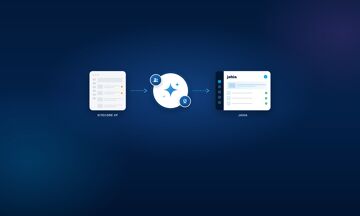
From Sitecore to Jahia: what migrates, and in which order
Fabrice Aissah
On Sitecore XP, the next step the vendor offers is SitecoreAI, its SaaS platform. For a heavily customized instance, that move is far from a simple upgrade: you have to rebuild your renderings and re-model your personalization. Once a rebuild is on the table, the choice of target platform is open again: stay with Sitecore by moving to SitecoreAI, or switch to one of the alternatives to Sitecore.
This article is for teams considering a move from Sitecore to Jahia through the free AI-powered CMS migration. It walks through each building block of a Sitecore site, the order in which they are migrated, and what the AI agents and Jahia experts take care of.
Key takeaways
- The AI-powered migration is free. Support from Jahia experts is included, all the way to go-live.
- No access to your Sitecore database to get started: the analysis starts from your site’s URL and sitemap.xml.
- Every building block has its Jahia equivalent: items, templates, renderings, media library, SEO metadata, languages.
- Personalization, forms, integrations and business logic are scoped and quoted at the diagnostic.
- Seven steps, from diagnostic to switchover. Your Sitecore site stays live until you decide to switch.
- First result within days, complete project in 1 to 3 months.
Migrating to Jahia with AI: how it works in a nutshell
Jahia migrates the websites and portals of organizations changing CMS for free, using AI. AI agents recreate the public site in a separate Jahia instance: components, content, media, SEO metadata and navigation. Jahia experts handle what AI does not do on its own, such as integrations, authenticated areas, security rules, redirects and go-live. Complex business customizations are quoted at the diagnostic, before any commitment. Beyond that, you only pay for the platform subscription.
Your Sitecore site is never modified. You compare both versions before making a decision, and the most convincing step is seeing your own site rebuilt: you can request a demo even before starting the diagnostic.
What migrates from Sitecore to Jahia
The table follows the structure of a Sitecore XP instance: content and its presentation first, then SEO, then everything related to marketing and third-party tools. The last column shows who does the work, and when.
| In Sitecore | In Jahia | How it moves |
|---|---|---|
| Items and content tree, including data items shared across several pages | Structured content and site tree. Shared items become reusable content | Recreated by the AI agents from the public site, then reviewed by the experts. Content missing from the sitemap is brought over with the experts |
| Data templates, standard values, branch templates | Jahia content types | Model proposed by the AI agents based on the analyzed pages, then decided with you in step 2 |
| Renderings (view and controller renderings, SXA or JSS components) and placeholders | Jahia components organized in a library, which your editors assemble in the visual editor | Rebuilt by the AI agents from the public rendering, reviewed by the experts. If you share the code, it serves as a reference for server-side logic |
| Media Library: images, PDFs, videos and their fields (alt, title) | Jahia media with their metadata | Public files are migrated with their references and alt texts. The link with an external DAM is scoped at the diagnostic |
| SEO metadata, Open Graph tags, structured data | The same fields in Jahia | Carried over by the AI agents, validated by the experts before go-live |
| URLs, aliases and existing redirects (URL Rewrite module, SXA redirect maps) | Jahia URL structure and redirect plan | Redirect plan prepared by the experts, starting with your pages with the most organic traffic |
| Language versions and language fallback rules | Multilingual content | Migrated language by language. Fallback rules are reviewed at the diagnostic |
| Multiple sites (site definitions, SXA tenants) | Multiple sites on a single Jahia platform | No volume limit. The order in which sites are migrated is set at the diagnostic, and multisite can extend the timeline |
| Personalization rules (rules engine, profile cards, goals) and xDB data | Personalization built into Jahia | Reviewed together at the diagnostic. The rules actually in use are recreated by the experts. What happens to xDB data is decided at the same time |
| Workflows and security roles | Jahia approval workflows and permissions | Recreated by the experts with your teams |
| Sitecore Forms or Web Forms for Marketers | Jahia forms | Scoped at the diagnostic, recreated by the experts with data sent to your tools |
| Integrations: CRM (Salesforce, Dynamics), marketing automation, search (Solr, Coveo), analytics | Jahia connectors, including stackConnect and its 1,000+ connectors | Handled by the experts, scoped at the diagnostic |
| Extranet or authenticated portal | Jahia authenticated portal | Included in the offer, handled by the experts |
| Custom business logic (pipelines, processors, custom .NET code) | Custom development | Quoted at the diagnostic |
The offer covers the public website and your authenticated portal. Complex business customizations are quoted separately, at the diagnostic.
In which order
The migration runs in seven steps. Your Sitecore site stays live for the whole project.
1. The diagnostic
Jahia experts analyze your public site from its sitemap.xml: number of pages, components, media, metadata, internal links and visible integrations. You receive an estimate that separates three scopes: what the AI agents automate, what the experts handle with assistance, and what requires custom development. The diagnostic is free.
2. The content model
The AI agents propose a content model based on the analyzed pages. You review it with the experts to decide which Sitecore templates to keep, merge or retire. On an instance with ten years of history, this is often the step where the most cleanup happens.
3. The components
Your renderings become Jahia components, grouped in a library. They come first so your editors can quickly review pages in a layout they already know, even before all the content is migrated.
4. Content and media
Pages, media and language versions are recreated in the new structure, along with navigation and internal links. Everything happens in a separate Jahia instance, away from your production site.
5. SEO
Titles, descriptions, Open Graph tags and structured data are carried over. The experts then build the redirect plan, so every Sitecore URL has a destination in Jahia. Pages that bring you organic traffic go first.
6. Personalization, forms and integrations
The personalization rules kept at the diagnostic, the forms and the connections to your tools are recreated by the experts, then tested with your teams.
7. Acceptance testing and switchover
Your team reviews, gets trained on the editor and signs off. Go-live is a separate step, which you trigger when you are ready.
How the AI-powered migration works
In a traditional migration, every template and every page is rewritten by hand, which often takes 6 to 18 months. Jahia hands this rebuild to specialized AI agents, and its experts check the work at every step. Three agents work in parallel:
- Website Analyzer crawls the sitemap.xml and inventories pages, components, media, metadata and internal links.
- Component Implementer rebuilds the components in Jahia and organizes them in a reusable library.
- Content Creator recreates the public content with its media, SEO metadata and navigation.
The analysis requires no credentials and no access to your Sitecore database. Sharing the source code speeds up the review, but it is not required. Every agent action is approved by an expert before moving on.
A first working result is visible within a few days. The complete project takes 1 to 3 months.
The offer
The AI-powered migration is free, and support from Jahia experts is included, all the way to go-live. Complex business customizations are quoted at the diagnostic. After that, you only pay for your Jahia subscription: save up to 50% on your annual CMS subscription, compared with your current platform, for equivalent digital experience capabilities. On the timeline side, the approach saves up to 90% of the time of a traditional migration. What the free offer covers is spelled out in the contract, and the terms of the free CMS migration are detailed on our dedicated page.
Before you start: a short checklist
- Make a list of your Sitecore sites, with their languages and version.
- Check that each site has an up-to-date sitemap.xml: it is the starting point of the analysis.
- Export the pages that bring you the most organic traffic. These are the ones redirected first.
- Note the personalization rules that are actually used today, not the ones configured years ago.
- List your integrations: CRM, marketing automation, search engine, forms, analytics.
- Name the people who approve content and design on your side.
The full checklist goes further, with about fifty items across nine themes, from site inventory to project organization.
Frequently asked questions
How long does a migration from Sitecore to Jahia take?
Does Jahia need access to our Sitecore code or database?
Is our Sitecore site modified during the migration?
What happens to our SEO?
What happens to our Sitecore personalization rules?
Should we move to SitecoreAI instead?
Discover
Related resources
 Blog
CMS Migration checklist: What actually survives the move, your content or your templates and code?
Automated CMS migration offers are everywhere. But an enterprise website is built in five layers, and they don't migrate the same way. Here is what actually moves from one CMS to another, and a checklist to verify it layer by layer.
 Blog
How Agentic AI Is Transforming Content Management in 2026: What Your CMS Must Be Able to Do
Agentic AI no longer stops at drafting text: it audits, fixes, translates and optimizes content inside your CMS, under human control. Here are the 7 capabilities your CMS needs in 2026.
 Blog
PHP2Shell: what to do after a security flaw
On October 21, 2026, PHP fixed two critical flaws known as PHP2Shell, and OpenJDK published two advisories the same week. No platform is immune. Here is where flaws occur and the six steps to follow after they are announced.
 Blog
jahia-argus-factory-2026
 Blog
Migrate from Adobe AEM to Jahia: the 5 Steps of a Free AI-Powered Migration
Free assessment, AI-powered rebuild, validation, redirects and go-live: the 5 steps to migrate from Adobe AEM to Jahia in 1 to 3 months, run by Jahia experts.
 Blog
Best Java CMS in 2026: what to check before you choose a platform
What to check before you choose the best Java CMS: the extension surface, modularity, licensing and deployment, plus the questions to ask every vendor.