Best Java CMS in 2026: what to check before you choose a platform
Romain Gauthier
Your organization runs on Java and your security reviews, observability, build pipelines and hiring all assume the JVM. Many CMS vendors offer a Node.js stack and a SaaS subscription, which gives your teams a second stack to operate and secure.
A Java CMS is a content management system that runs on the JVM and that you extend with your own code. The best Java CMS is the one that fits your teams. Six questions show which one that is:
- Can my front-end developers work in the rendering layer?
- What can I deploy into the platform: APIs, actions, jobs, listeners?
- How does the platform handle library conflicts, versions and updates?
- Which deployment options, runtime and license does it offer?
- Does the vendor's support hold up when something breaks?
- Will the editors, who outnumber my developers, accept it?
TL;DR
- Most "Java CMS" lists include platforms that have not shipped a feature release in years. Three checks remove them.
- "Open source" covers four different license models, so read each vendor's LICENSE file.
- Modularity does not require microservices: OSGi has provided it inside one process for 20 years.
- The most useful test is whether both your Java team and your front-end team can deploy code into the platform.
1. How to find the best Java CMS: three checks to shorten the list
Software directories list 15 to 20 Java CMS platforms and many of them have not shipped a feature release in years. Three checks show which projects are still maintained:
- Release cadence. If the last feature release is more than a year old, the project is in maintenance mode, whatever its website says.
- Runtime support. A maintained project publishes a support matrix for runtimes, containers and databases. Without one, you cannot tell whether the project keeps up with the platform you run.
- Living documentation. Documentation that stopped several versions ago shows how much the vendor still invests in engineering.
This article does not label any platform as abandoned, because the three checks give you that answer.
2. Modularity without microservices
Over the last decade, "modular" became a synonym for "microservices" in many teams. Microservices run each part of a system in its own process, at three costs:
- Every internal boundary becomes a network call.
- Independent deployment requires service discovery, distributed tracing, retry policies and authentication for each service.
- The on-call scope grows with every service you add.
These costs are worth paying when many teams must release independently. A content platform is usually one product run by one team, so the costs rarely pay off there.
Teams usually want isolation, independent deployment and explicit contracts from microservices. All three fit inside one process, in an architecture called a modulith. Spring now ships Spring Modulith, but it addresses a different scope: it verifies module boundaries in tests, inside an application you own. A content platform needs those boundaries at runtime, because it must isolate third-party modules, resolve conflicting dependency versions and deploy modules while it runs. We explain the difference in Why is there no enterprise Java CMS based on Spring Framework or Spring Boot?
The difference shows most on small work such as a CRM integration, a nightly sync job or a custom approval step:
| Microservices | Modulith CMS | |
|---|---|---|
| Each integration needs | a service, a repository, a pipeline, a deployment target, a monitoring configuration and an on-call entry | a module |
| It runs in | its own process | the platform process, isolated from other modules |
| To remove it, you run | a decommissioning project | an undeploy |
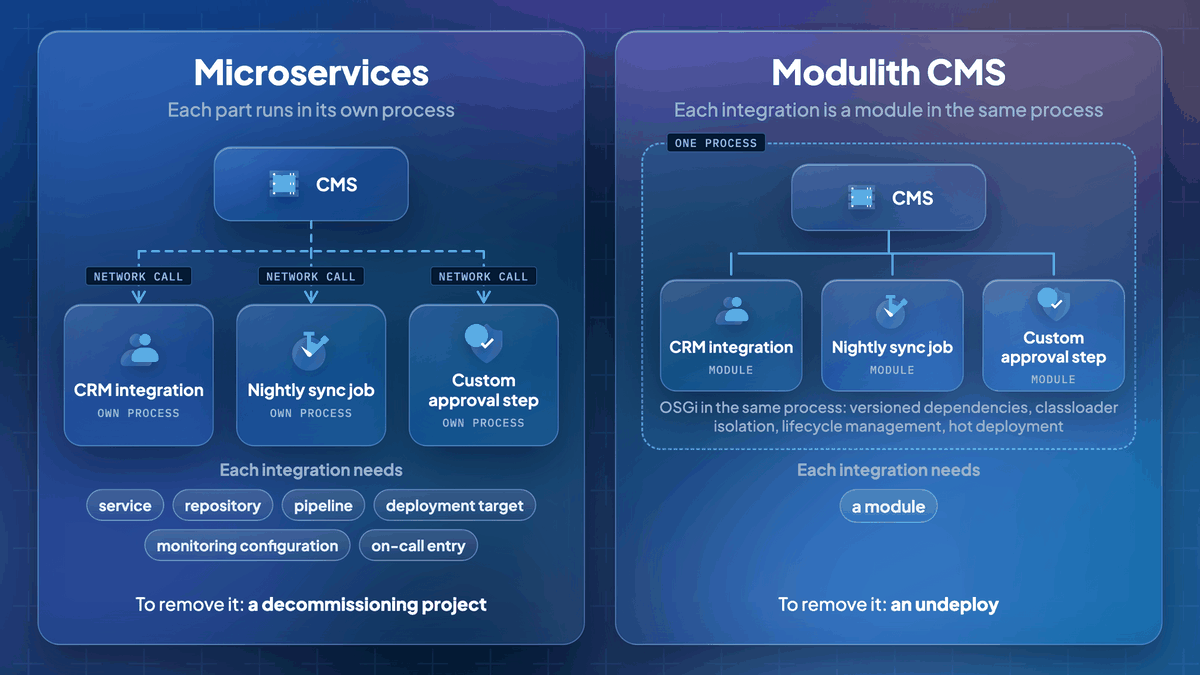
Java has had a standard for this for two decades: OSGi. OSGi provides versioned dependencies, classloader isolation, lifecycle management and hot deployment. JPMS modularized the JDK itself and OSGi addresses modularity at the application level.
OSGi is common across this market. AEM runs on Apache Felix, dotCMS uses Felix for plugins and Jahia runs on Apache Karaf. For each platform, the useful question is how far OSGi goes: a plugin layer at the edge of the product, or the module system of the whole platform.
Ask the vendor: "My module needs Jackson X and your core ships Jackson Y. What happens?" Then ask where exactly the plugin layer stops.
Apply the same test to SaaS headless
With SaaS headless, you do not run a platform and the functions of its modules move to other vendors. Search, personalization, forms, DAM, translation and preview each become a third-party service with its own authentication, SLA, release cadence and invoice. Your team writes and operates the middleware that connects these services.
Assess this set of services as one system:
- What the integrations cost in total.
- Which failure modes span several vendors.
- Who gets paged when two services disagree.
Some teams do this math and find they bought the microservices estate they wanted to avoid: the vendors operate the services and the team operates every integration between them.
3. Where your own code runs
A CMS on the JVM helps only if your own code runs inside it. Check where your logic ends up: ERP and SSO integrations, workflows and business services either deploy into the platform or accumulate as middleware around it.
In Jahia, Java modules are OSGi bundles that run on Apache Karaf, as the technical overview describes. For the headless angle, see our headless Java CMS guide.
4. Check the whole extension surface
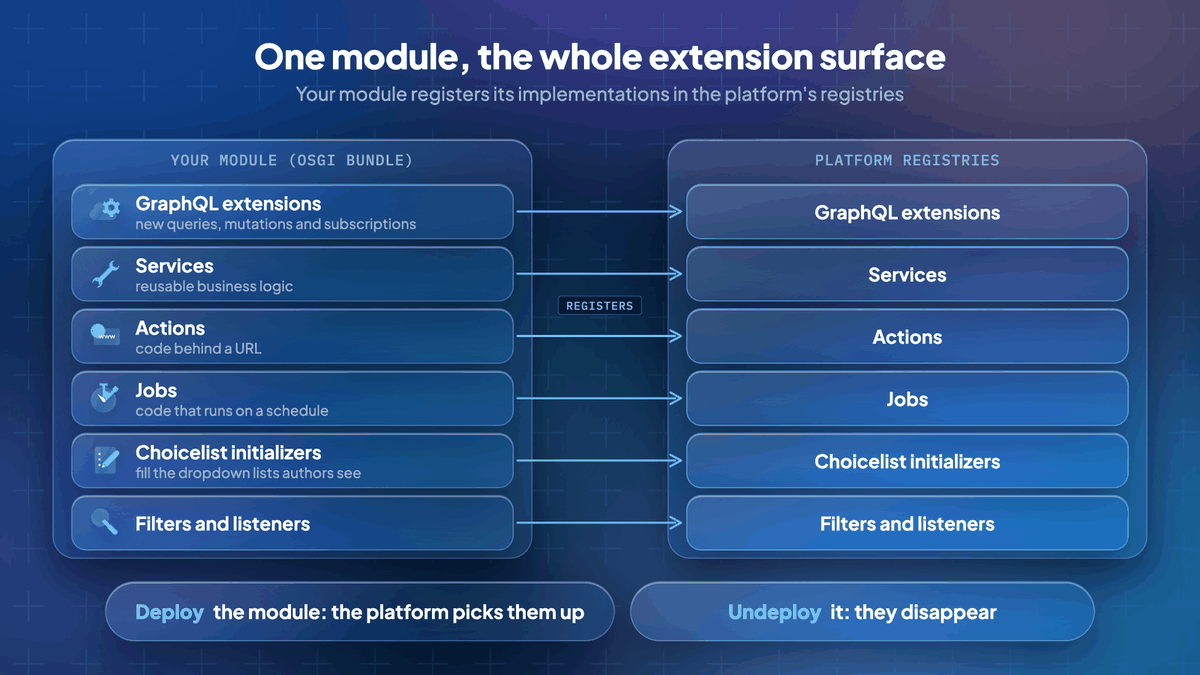
Rendering is only part of what you will extend. Expect these extension points, shown here with Jahia's names (available in Java modules):
- GraphQL extensions: new queries, mutations and subscriptions
- Services: reusable business logic
- Actions: code behind a URL
- Jobs: code that runs on a schedule
- Choicelist initializers: code that fills the dropdown lists authors see
- Filters and listeners
These extensions use the OSGi whiteboard pattern: your module registers its implementations in the platform's registries. Deploy the module and the platform picks them up, undeploy it and they disappear, with no core patch and no fork.
Two sample repositories show the code: GraphQL extension example and OSGi modules samples.
Ask the vendor: "Can I extend your API schema, or can I only consume it?"
5. Front-end developers inside the platform
Since the 2019-era "Java CMS" articles, one thing changed: most Java organizations now employ React and TypeScript engineers. Usually the back-end team owns the CMS, the front-end team builds a separate front end and every project pays for the integration between them.
Jahia's JavaScript modules remove that split. They are available since Jahia 8.2 and production-ready since 8.2.3.
- Front-end developers build Jahia functionality as npm packages, with server-side JSX or TSX, yarn packaging and no Java.
- The modules run inside the platform, not as a headless client, so editing, preview, publication, caching and authentication work without custom integration.
- For interactivity, they use partial hydration (islands): the server renders the HTML and only components that declare client behavior hydrate.
6. One platform, two languages
JavaScript modules and Java modules share the same platform services:
- JavaScript code calls Java services directly, without an HTTP call.
- The useServerContext() hook gives a React component the rendering context, the current JCR node and the platform's Java objects.
- The back-end team exposes OSGi services and the front-end team calls them from TSX.
- Both kinds of module use one deployment model, one security perimeter and one cache.

The JavaScript modules repository is under Apache 2.0.
Status: near-term direction, not shipped.
Upcoming JavaScript modules improvements:
- Filters, actions and choicelist initializers in JavaScript
- Query builder: create efficient content queries easily
- Content Patches: easier migration of definitions and content with TypeScript scripts
We are working to cover every extension point with modules and to expand JavaScript modules. Our public documentation lists server-side actions and tooling as upcoming.
7. Deployment on infrastructure you already run
- Jahia runs on Apache Tomcat, the servlet container many Java platform teams already operate.
- You can deploy it directly or use our Docker images, which run on OpenJDK since Jahia 8.2.3.
- The stack is Apache end to end: Tomcat for servlets, Karaf for modules.
- You deploy modules with Maven or yarn, without a platform restart.
- Jahia runs on-premises or in your own cloud.

The goal is that your platform team runs Jahia like the rest of your Java estate.
Ask the vendor: "What does it take to ship a change: a hot deploy, a restart, or a full pipeline run?"
8. "Open source Java CMS" covers four license models
"Open source Java CMS" is one of the most searched phrases in this category and it covers four business models. The difference shows at contract renewal, not at download.
| Model | Example |
|---|---|
| Copyleft license (GPL, LGPL) + commercial offering | Magnolia: GPLv3 Community Edition, commercial DX Core. Liferay: source code under LGPL-2.1-or-later or the DXP EULA, one platform since 2026.Q1, activated by a Free Tier key (free, valid 12 months) or a subscription key |
| Source-available, not OSI open source | dotCMS: Business Source License 1.1, source-available. Production use is free up to US $5 million in total finances, a commercial license is required above and the code converts to GPLv3 on 1 August 2029. |
| Community-only | Projects with no commercial edition, so no vendor support and no product management |
| Open core: Apache 2.0 core and commercial Enterprise distribution | Jahia (below) |
Jahia is open core. The core is available under Apache 2.0 or the commercial JSEL license, as the license header of our public repository shows. The Enterprise distribution is commercial. For JavaScript modules, the repository is under Apache 2.0 and some npm packages are under MIT: the library, the Vite plugin and the project creation tool.
Whatever the vendor, read the LICENSE file rather than the category label.
9. Eight checks to run before you sign
These differences rarely show in architecture diagrams, but they show in daily work a few months into the project.
- Content modeling. Some platforms build content types in a UI and others, Jahia included, deploy them as code that your pipeline versions and promotes. If your content model cannot move through your CI/CD pipeline, every release still depends on manual steps. See developer experience. Ask: "Are content types versioned with my code and how do they move across environments?"
- Security and compliance. Your CMS serves your most public attack surface, so check permissions, SSO, patching cadence and certifications against evidence. Our evidence is in the Jahia Trust Center, including the ISO 27001 certificate. Ask: "Can this run air-gapped or in a sovereign cloud and what data does it send back to the vendor?"
- Customer data. Form submissions, behavioral events and preferences produce a high volume of writes and that data needs a different architecture from content. Store it in a CDP. Jahia's CDP is built on Apache Unomi and integrated into the platform. If a vendor stores behavioral data in the content repository, expect to rewrite that part later.
- Full-text search. The search built into a content repository is not enough for a large site. Jahia's Augmented Search extends the GraphQL API with Elasticsearch, which gives relevance on full pages, results filtered by permissions and less load on the platform. See the Augmented Search architecture and the on-premises requirements.
- Deployment options. Expect a real choice between managed cloud and self-hosted, because requirements often change during a contract. Jahia offers both. See section 7 for the runtime and the Jahia Trust Center for our security posture.
- Support. Every vendor calls its support excellent, so judge it on written commitments. Look for version windows and end-of-life dates in writing, as in our maintenance and support policy, which defines the release rules. Runtime end-of-life dates are in our supported stack. Test the documentation on a real task. Ask: "When it breaks at 2 a.m., can my team read the source?"
- Upgrade cost. Module updates should be routine work and platform upgrades are where your real total cost of ownership shows. Ask: "Show me the migration notes from your last two major versions. What broke in customer modules and who fixed it?" If you face that cost today, consider our Free AI-powered CMS migration: the migration to Jahia is free and customers save up to 50% on their CMS annual subscription versus their current platform, for equivalent digital experience features.
- Editor experience. Editors outnumber developers and a Java CMS must also work well for them. Test authoring, preview and workflows with them, using our checklist of what to check for marketers on a headless project.
Java CMS platforms: Jahia, Adobe AEM, Magnolia, dotCMS and Liferay
These five vendor-backed platforms are the ones named in this guide. Apply the three checks of section 1 to each of them and to any other platform on your list. If you are already evaluating AEM, read our guide to AEM alternatives. If you are evaluating Liferay, read our guide to Liferay alternatives.
Which is the best Java CMS for your situation?
No platform fits every situation. This table matches common situations to a platform type.
| Your situation | Pick |
|---|---|
| You will never deploy code into the platform | Pure SaaS headless, which is simpler to run than any Java platform, ours included, if the section 2 check comes back clean. Include the third-party services and middleware in its price. |
| Brochure site, no integrations | A static site generator, which costs less and covers the need. |
| Java estate, back-end and front-end teams, integrations inside the platform, infrastructure you control | Jahia, built for this modulith case: OSGi modules for Java, JavaScript modules with built-in React SSR for the front end and JCR and GraphQL underneath, on your Tomcat servers or containers. |
How to evaluate a Java CMS: the questions for every vendor
Ask every vendor the same questions, us included and record any question a vendor cannot answer precisely.
- My module needs Jackson X, your core ships Jackson Y. What happens?
- Where exactly does your plugin layer stop? What can I not override?
- Show me the migration notes from your last two major versions. What broke in customer modules and who fixed it?
- Are content types versioned with my code and how do they move across environments?
- What does it take to ship a change: a hot deploy, a restart, or a full pipeline run?
- Can I extend your API schema (queries, mutations, subscriptions), or can I only consume it?
- Can this run air-gapped or in a sovereign cloud and what data does it send back to the vendor?
- When it breaks at 2 a.m., can my team read the source?
- What does your front-end model require of my team: skills, repositories, deployment?
If you prefer to test rather than read, request a demo and bring this list.
FAQ
What is a Java CMS?
What is the best Java CMS?
Is there an open source Java CMS?
What is the difference between a Java CMS and a headless CMS?
Which CMS platforms run on Java?
Discover
Related resources
 Blog
BlogStatic vs dynamic websites: SSG, SSR and what to choose
Static vs dynamic websites, against the MDN and AWS definitions: how each one is built, how to tell them apart, and where SSG, SSR, ISR and CSR fit in.
 Blog
BlogUnder the hood: hydrating React components in Java
How Jahia renders React on the server and hydrates it in the browser: a step-by-step look under the hood at GraalVM, Rolldown and hydrateRoot, with code.
Why is there no enterprise Java CMS based on Spring Framework or Spring Boot?
Spring Boot suits applications you deploy as one unit. See why an enterprise Java CMS that hosts third-party modules relies on OSGi to isolate each module.
 Blog
BlogHeadless Java CMS: In depth guide for developers
For Java Developers: what you should really look into when evaluating a headless Java CMS.
 Blog
BlogCustomizing pickers in Content Editor 4.1
When contributing web pages, editors have to create links to other pages of interest for the visitors, use or reference contents which have been created in different locations on the site, add images coming from the DAM, etc. For all of these tasks, they need to go through a “picker” interface, so they can select the desired resources. Jahia provides a set of such pickers out-of-the-box, which are generic enough to address the most common use cases. But did you know that you can customize them to ease the content reference selection for your contributors?
 Blog
BlogJahia’s Open Source DXP Portal Development
How web portals in java help you integrate digital experiences across different touchpoints to give your customers both personalization and consistency
 Blog
BlogJava Based CMS Built on Apache Tomcat
Running Apache Tomcat is an effective way to run a java based, open-source content management system (CMS), and create dynamic content for your readers.
 Blog
BlogInnovation Through Iteration
Jahia’s latest update is built to adhere to the iterative mindset. Instead of going for the big fireworks display that often accompanies a flashy acquisition or new piece of software, we took a step back and answered three key questions.