
Software Security: Best Practices for Securing CMS
Clement Egger
Your business relies on its CMS and software to hold sensitive business and customer data. Software security protects your site and data from hackers and breaches, keeping both business operations and customer information safe.
In this article, we'll discuss different IT security types and share 5 practices to make your security airtight.
What is software security?
Any tools and practices that you use to protect your software from hackers, unauthorized access, data breaches, and cyberattacks are a part of your software security. Firewalls, encryption, and anti-virus software are some tools that protect your devices, network, apps, and data from falling into the wrong hands.
A good software security strategy shouldn’t have you doing most of the work. Today, many CMS platforms come with built-in security features that automate most of the heavy lifting, keeping your systems safe while alerting you only to potential vulnerabilities and necessary updates.
What are the four types of IT security?
All types of IT security basically protect your information and assets (digital and otherwise) from unwelcome access or attacks. Mainly there are four types of IT security:
- Application Security keeps your apps from getting hacked by using threat modeling, secure coding practices, and continuous vulnerability assessments.
- Network Security protects your data communications from unauthorized access and keeps them from entering or spreading on your network.
- Endpoint Security protects every device you use, from computers to smartphones, by managing their access and monitoring fishy activities.
- Data Security keeps all your data safe, whether it’s on your devices or on the cloud.
Why is Software Security Important for Your CMS?
CMS security is not just for protecting your information but also for maintaining trust and reliability of your business with your customers, partners, and all stakeholders.
Software security helps to:
- Protect sensitive customer and business data to avoid financial and legal trouble
- Keep business operations running smoothly by keeping hackers from getting into your system.
- Follow regulations and legal standards to avoid fines and penalties.
- Keep the hackers out so your site and systems stay safe and sound.
Best Practices for Securing Your CMS
Here are five key security practices used by top companies to keep their data safe.
To find out more, download our complete checklist
Regular and frequent scanning
When it comes to CMS security, we believe that prevention is always better than cure. By regularly scanning your CMS for vulnerabilities, you detect risks before time and can address them before any damage is done.
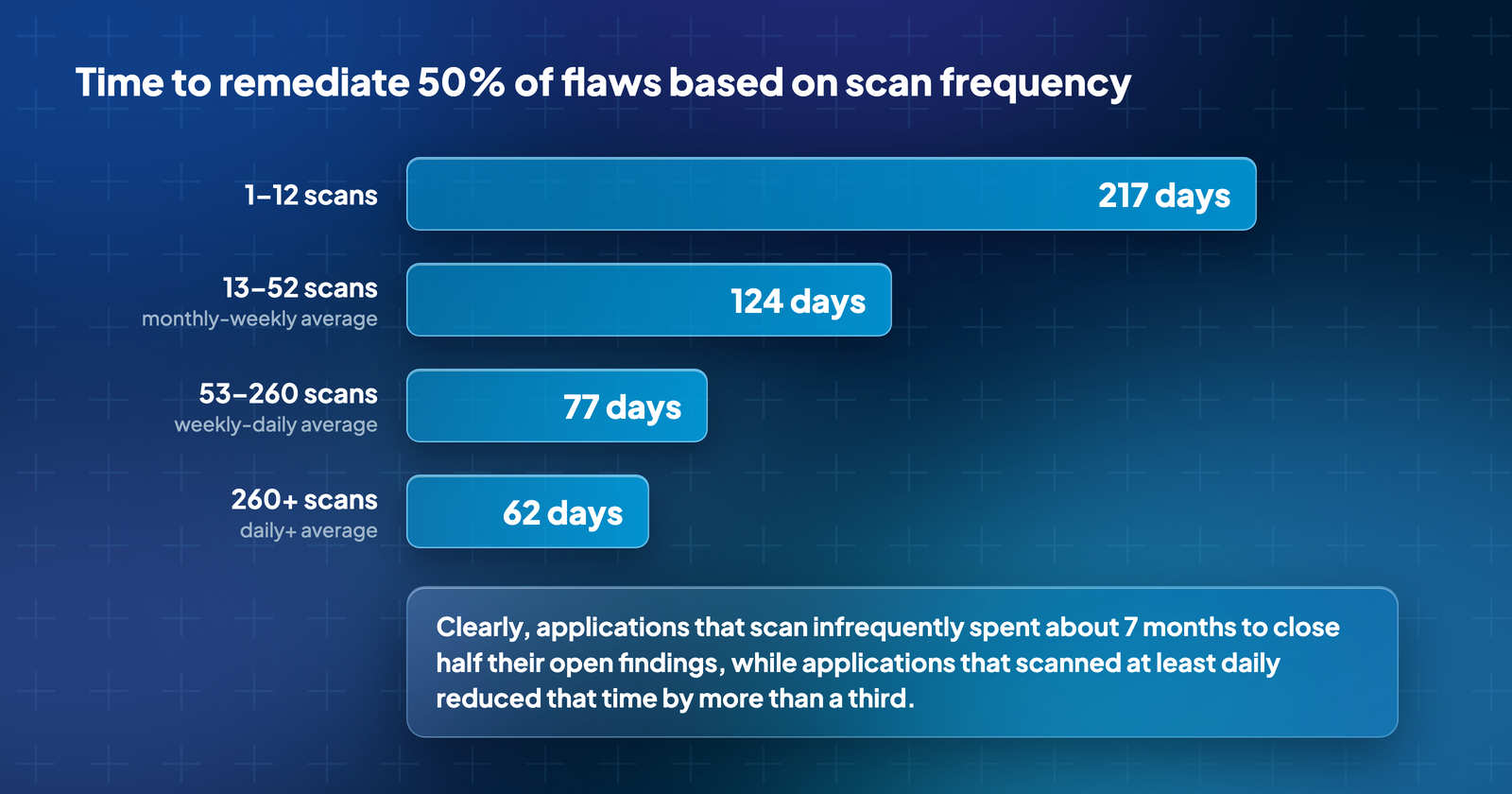
Regular and automated vulnerability scanning shortens the time needed to address security concerns.
According to a study by the Ponemon Institute, companies that scan more than 260 times per day are able to fix 50% of vulnerabilities within just 62 days, whereas those scanning less frequently, around 1-12 times per day, take as long as 217 days for the same level of remediation.
How to do it?
- Use automated security tools tailored to your CMS.
- Make a routine of scanning regularly. It could be daily, weekly, or after important updates.
- Review the results to identify and prioritize risks by their severity and impact.
- Have immediate response protocols in place for high-risk vulnerabilities.
- Use tools to analyze past scan data to spot trends, then refine your scanning strategies and security measures accordingly.
Patch management
The more important a system or piece of data is, the faster it should be updated or patched. This helps prevent attackers from exploiting known vulnerabilities in the software, which leads to security breaches.
It's like checking that the most important doors in your house are fixed and locked first.
The study also shows that in 2019, 60% of data breaches involved vulnerabilities for which patches were available but not applied on time. This shows that these breaches possibly could have been avoided with timely patching.
How to do it?
- Get ahead of it and identify which systems are critical and what vulnerabilities they may have.
- Prioritize updates based on the criticality and severity of vulnerability.
- Use automated tools to detect and apply patches.
- Regularly check that patches are applied correctly.
- Include quick patching in your incident response strategy.
Prioritizing vulnerabilities
Not all vulnerabilities are made equal. So, your remediation efforts should not be spread evenly across all vulnerabilities. Instead, you should focus on critical threats first. To identify such “critical vulnerabilities”, consider their impact and likelihood of occurrence. This way, you’ll be able to mitigate the risks that pose the greatest danger to your operations.
Studies also show that prioritizing threats based on both factors improves your security measures, making it 11 times more effective at minimizing risks than using severity scores alone.
How to do it?
- List and categorize all assets according to their importance to your business operations.
- Use updated tools to scan for vulnerabilities regularly.
- Use Threat Intelligence to assess which vulnerabilities could be most damaging.
- Fix most critical vulnerabilities.
Automation
Manual checks and practices are prone to human error. Automation takes care of a lot of your vulnerability management without you having to worry about it or keep checks on it 24/7.
Automated tools continuously scan for issues, apply patches, and monitor threats in real-time. They also integrate threat intelligence, enforce secure access protocols, and ensure regular backups.
Here’s what you get when you automate CMS security:
- Quick identification and response to security threats.
- Resolution of routine attacks with minimal human input.
- Less manual tasks.
- Uniform application of security policies.
- Less operational costs and shortens response times.
- Simplifies regulatory reporting and reduces risk.
It's no surprise that studies show that organizations using automation not only cut remediation time but, with tools like automated patching, they also reduce vulnerability risks by over 50%.
How to do it?
- Identify security needs and areas for automation within your CMS.
- Select and integrate appropriate tools for continuous scanning, auto-patching, and real-time monitoring.
- Set up notifications for important alerts.
- Train staff to manage and monitor these tools regularly.
Integration of security in the development lifecycle
Big tech companies like IBM use a proactive approach to software security. They use automation to carry out security checks and balances throughout the development process, from design to deployment. This lets you identify and address vulnerabilities early on.
Plus, automation of security tasks
- reduces the risks in the final product
- lowers the cost and effort of post-deployment fixes
- and creates a stronger, more secure foundation for your CMS.
How to do it?
- Train your team members about security awareness.
- Include threat modeling and security controls in the design phase.
- Use secure coding practices and static analysis tools to spot vulnerabilities early.
- Conduct automated security tests and regular code reviews throughout your development process.
- Test in a staging environment and get security approvals before deployment.
Conclusion
You don’t need the most expensive tools or the smartest practitioners to make significant security improvements. What you really need is a CMS that is tailored to your specific needs and handles much of the security management for you.
Jahia CMS automates your entire vulnerability management.
Jahia:
- Performs continuous scans with tools like Dependency-Track
- Conducts regular security assessments for timely prioritization
- Automates patch deployment to reduce exposure risks
- Maintains continuous monitoring with a clear incident response plan
Discover
Related resources
 Blog
BlogEU AI Act labelling requirements: when to label AI-generated content and how to do it in Jahia
EU AI Act Article 50: when AI-generated text must be labelled, what the editorial control exception requires and how to set it up in Jahia, step by step.
 Whitepaper
Data Privacy in a Post-GDPR World
This whitepaper explores the impact of GDPR on data privacy, business practices and technologies shaping trust-based customer relationships.
 Blog
BlogHow to Make a Website Accessible: Guidelines, Design Practices, and Compliance Strategies
Learn how to make your website accessible by following web accessibility guidelines, adopting inclusive design practices, and achieving WCAG compliance.
 Blog
BlogCMS Security: Why It's Crucial for Your Business
CMS security is vital to secure your content management system, protect business data, and defend against cyber threats. Read the blog to learn how to safeguard your business.
BlogWhat You Need to Know About Security When Choosing a Cloud Content Management System
Evaluate your Cloud CMS's compliance with security standards by analysing processes, assessing standards, and reviewing objective third-party evaluations.
 Blog
BlogJahia : CMS and DXP HIPAA Compliant
Jahia is officially HIPAA compliant! Carefully manage PHI within the Jahia DXP.
Did you know open source free GDPR tools can help?
Free open-source tools help with GDPR compliance by managing data, consent, and collection, but a comprehensive approach is still essential.
 Blog
BlogConfiguring a web server to secure web sites powered by DX
In today’s world, where criminals are trying to hijack websites and sessions or infiltrate harmful scripts to cause damage or even gain access to sensitive data, it is very important to reduce risks by implementing available countermeasures. The Open Web Application Security Project (OWASP) provides documentation and tools to help making websites more secure or to detect vulnerabilities.
 Blog
BlogEase your authorization process with Oauth and social login
Registration and authentication steps are a big concern for visitors who have to create a new login and password that they will have to remember. The experience can even get worse when visitors are using their mobile : having to type in their password twice, switch to their email application to confirm their subscription. The complexity of this system often leads to a loss of potential visitors and customers. Using a social login featurereduces registration and authentication to a single click at best and makes the overall experience much easier.