
Best accessibility testing tools for web applications
Clement Egger
Accessibility testing tools check a web page against rules such as the WCAG success criteria and report what they can detect. They catch some of the issues and leave the rest to human review, so they help you size the work before an audit.
Accessibility testing software ranges from browser extensions to command-line tools. These 11 accessibility testing tools cover everything from checking a single page to checking PDFs. Running them before an audit gives you an overview of the work required and helps you plan resources accordingly.
What accessibility testing tools can and cannot check
An automated accessibility testing tool applies a set of rules to a page and reports what it can detect, such as missing text alternatives, empty buttons or low color contrast. It cannot judge whether a text alternative is relevant or whether a page makes sense with a keyboard. For that, a person needs to test with the keyboard and a screen reader.
Even the engines built for automation say so: axe-core, the open source engine from Deque, marks a result as incomplete when it cannot be certain and manual review is needed. A good test combines both approaches.
Accessibility testing tools at a glance
| Tool | Type | License or cost | Standard or scope | Good for |
|---|---|---|---|---|
| WAVE | Browser extensions and API | Extensions, subscription API | Accessibility and WCAG errors | Visual check of a single page |
| axe DevTools | Browser extension built on axe-core | axe-core is open source (MPL 2.0) | WCAG 2.0, 2.1 and 2.2 | Developers and automated tests |
| Lighthouse | Audit run in Chrome DevTools or the command line | See publisher | Accessibility audits weighted by impact | A quick score and a list of issues |
| Accessibility Insights for Web | Browser extension | Open source | WCAG 2.1 AA assessment | Guided automated and manual checks |
| Pa11y | Command-line tool | Free and open source | Accessibility issues on pages | Running checks across many pages |
| ARC Toolkit | Browser extension | Free | WCAG 2.1 A and AA | One page at a time, with contrast and tab order |
| HeadingsMap | Browser extension | See publisher | Heading structure | Checking heading levels |
| Colour Contrast Analyser | Desktop application | Free | WCAG 2.0, 2.1 and 2.2 contrast | Color contrast |
| NVDA | Screen reader for Windows | Free | Manual testing | Testing as a screen reader user |
| VoiceOver | Apple screen reader | See Apple | Manual testing | Testing on Apple devices |
| PAC | Windows application | Free | PDF/UA and WCAG | PDF accessibility |
Web accessibility testing tools for websites and web applications
WAVE
WAVE, from WebAIM, is a suite of evaluation tools that helps authors make web content more accessible. Browser extensions for Chrome, Firefox and Edge test a page directly in the browser and point out accessibility and WCAG errors on the page itself. A subscription API and a stand-alone API with the testing engine exist for teams that want to build testing into their own infrastructure.
axe DevTools
axe DevTools is Deque's bundle of accessibility testing tools for websites and web apps, with a browser extension for Chrome, Firefox and Edge. Underneath, axe-core is the open source accessibility testing engine, released under the Mozilla Public License 2.0. Its rules cover WCAG 2.0, 2.1 and 2.2 at levels A, AA and AAA, plus a set of best practices. It is designed to run alongside existing functional tests.
Lighthouse
Lighthouse can be run in Chrome DevTools, from the command line or as a Node module. It has audits for performance, accessibility, SEO and more. Its accessibility score is a weighted average of accessibility audits. Each audit passes or fails. The weights come from axe impact assessments. Manual audits are not part of the score, so a high score does not replace a manual review.
Accessibility Insights for Web
Accessibility Insights for Web is an open source browser extension for Chrome and Microsoft Edge, from Microsoft. Its FastPass starts with the common, high-impact issues and is meant to take less than five minutes. The tool can then guide you through an assessment of WCAG 2.1 AA coverage.
Pa11y
Pa11y is a set of free and open source tools that help designers and developers make web pages more accessible. Its command-line interface loads web pages and highlights accessibility issues. pa11y-ci runs through a list of pages and is geared toward continuous integration.
ARC Toolkit
ARC Toolkit, from Vispero, is a free browser extension for Chrome and Firefox. It checks one web page at a time against the WCAG 2.1 Level A and AA guidelines. It also identifies color contrast problems and highlights tab order.

HeadingsMap
A relevant hierarchy of headings is essential to the accessibility of a page. The HeadingsMap extension for Chrome and Firefox generates a document map of the page from its headings and HTML5 sections and shows the errors in the structure, such as incorrect heading levels.
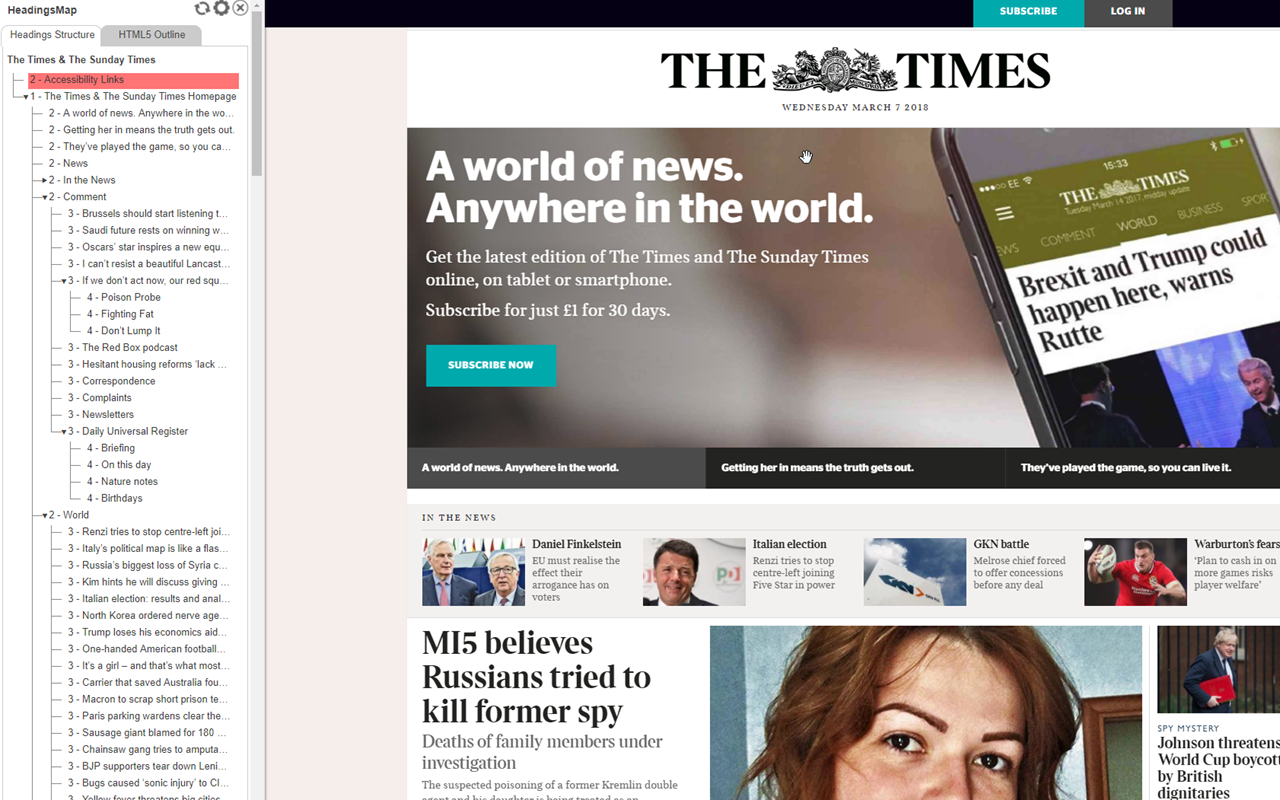
Tools for color contrast, screen readers and PDF documents
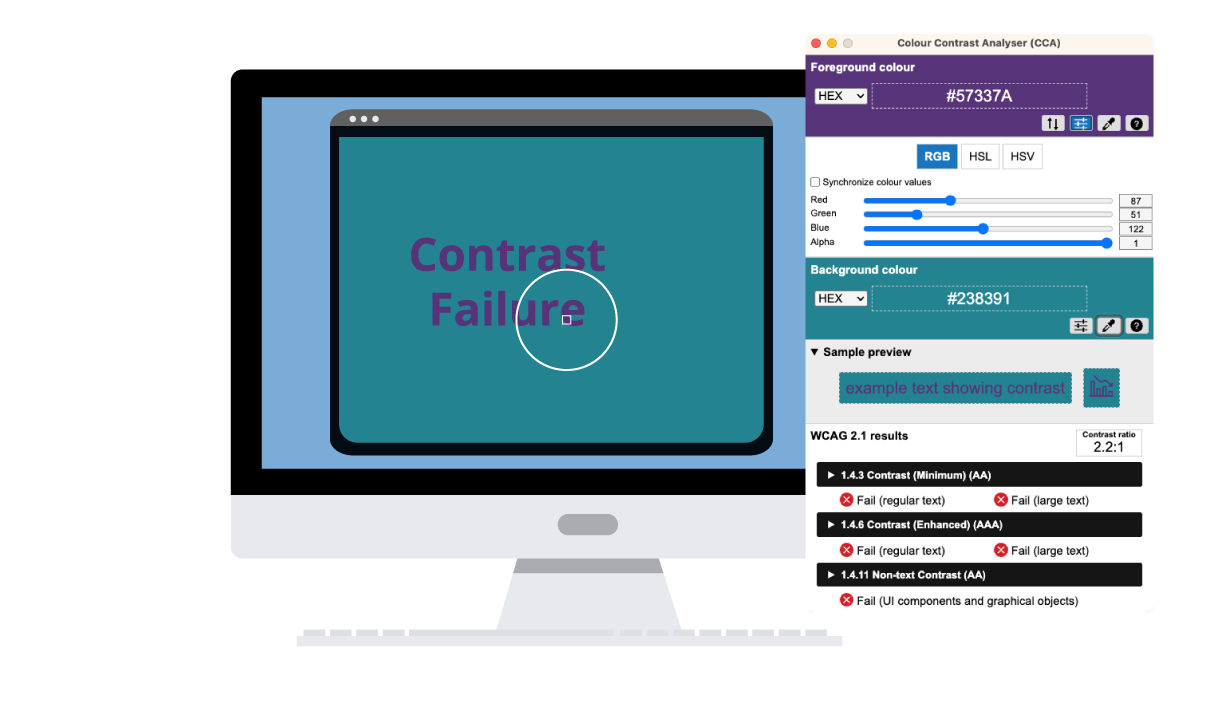
Colour Contrast Analyser
The Colour Contrast Analyser, from Vispero, is a free application for Windows and macOS. It calculates contrast ratios against WCAG 2.0, 2.1 and 2.2 criteria. At level AA the thresholds are 4.5:1 for normal text and 3:1 for large text. It includes an eyedropper to pick colors from the screen and a color blindness simulator.
NVDA
NVDA is a free screen reader for Windows 10 and later, made by NV Access. Browsing a page with it shows how a screen reader user hears the heading hierarchy, the text alternatives of images and the labels of interactive elements.
VoiceOver
VoiceOver is Apple's screen reader. Apple provides setup guides for iPhone, iPad and Mac, so you can test the same points as with NVDA on Apple devices.
PAC
PAC, the PDF Accessibility Checker, is a free Windows tool from the PDF/UA Foundation. It checks the accessibility of PDF files against PDF/UA and WCAG. It also offers a screen reader preview and a tag tree view.
Browser extension, plugin or widget: what is the difference?
These three terms name different tools. A browser extension is installed by the person who tests and flags issues on the page on screen. A plugin or module is installed in the CMS of a site or in a design tool. A widget is added to a site and gives its visitors display settings.
Several tools on this page come as browser extensions, including WAVE, axe DevTools, Accessibility Insights for Web, ARC Toolkit and HeadingsMap. Pa11y is a command-line tool.
What do the standards say? WCAG 2.2 states that conformance is for full web pages only. The WCAG-EM 2.0 evaluation methodology from the W3C sets out an evaluation in steps: define the scope, explore the site, select a representative sample of pages unless the whole site is evaluated, evaluate it and report the findings. Conformance is assessed on the pages themselves.
The plugin or extension you can install also depends on your CMS, whether it is traditional, headless or hybrid. The choice is made with the team that runs an enterprise CMS or a DXP platform as much as with the accessibility team.
Which standard to test against
Test against WCAG 2.2, the current W3C Recommendation since 5 October 2023. WCAG 2.0 and 2.1 remain Recommendations. The W3C advises using 2.2. WCAG 3.0 is still a working draft. Tool coverage varies: the axe-core rules cover WCAG 2.2, while ARC Toolkit and the Accessibility Insights assessment target WCAG 2.1. Check which version each accessibility testing tool tests.
In the European Union, Directive (EU) 2019/882, the European Accessibility Act, has applied since 28 June 2025 to certain services provided to consumers. In France, the national reference is the RGAA, currently in version 4.1.2 (updated on 18 April 2023), with a version 5 in preparation for the end of 2026.
Jahia accessibility resources
We have put together resources to help you answer questions about web accessibility and accessibility testing, depending on where you are in your journey:
- Checklist of 13 concrete actions to work towards compliance
- 10 ways to improve your web accessibility
- What makes a CMS accessible
FAQ
What are the best accessibility testing tools?
How can I test a website's accessibility?
Which accessibility testing tools are free and open source?
What is the difference between automated and manual accessibility testing?
Which accessibility testing tool checks color contrast?
Which standard should I test against?
Which browser extensions can test accessibility?
How do I run a website accessibility audit?
Discover
Related resources
 Blog
BlogAI Overviews: is your CMS ready for generative search?
Google says AI Overviews need no special optimization. What your CMS actually changes is your ability to hold SEO fundamentals across thousands of pages.
Practical Guide to Web Accessibility (USA)
A practical guide to U.S. web accessibility covering ADA, Section 508, POUR principles and a step-by-step roadmap to compliance.
Practical Guide to Web Accessibility (EN)
A comprehensive guide to web accessibility covering standards, legal requirements and practical steps to achieve long-term compliance.
 Blog
BlogWhat is an accessible CMS?
What is an accessible CMS? Learn the features that make a CMS accessible, why it matters and how to choose or configure one that meets WCAG and ATAG.
 Blog
BlogGlobal accessibility: design tips to make all your websites compliant
How to design large-scale accessible websites? Here are some keys to multi-site compliance.
 Blog
BlogHow to Make a Website Accessible: Guidelines, Design Practices, and Compliance Strategies
Learn how to make your website accessible by following web accessibility guidelines, adopting inclusive design practices, and achieving WCAG compliance.
 Blog
Blog10 Effective Ways to Enhance Web Accessibility
Learn how to make a website accessible with best practices and features. Discover 10 ways to enhance web accessibility and create an inclusive online experience for everyone.
 Blog
BlogDigital Accessibility – The First Step Towards Personalization
Discover how Contentsquare’s accessibility module can be deployed on Jahia sites, letting visitors adjust the website’s appearance to fit their needs.